Contacts - Phone Call Launcher
- 4.0
- Rating
- 10.00K
- Installs
- Free
- Price

 Analysis by App-foxy
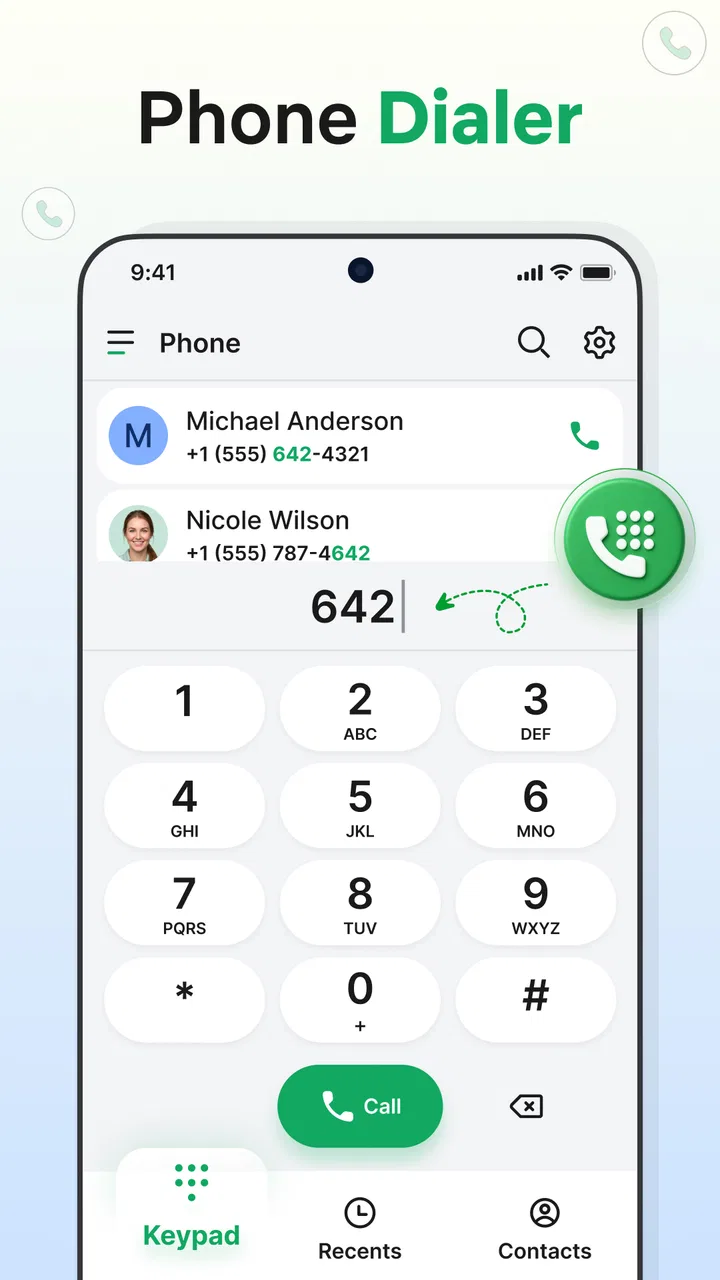
When a phone is shared around a household, the quickest way to reach the right person often matters more than having another full-featured communication platform. Contacts - Phone Call Launcher takes a focused approach: it brings the phone dialer, saved contacts, and call history into one communication app. I found that focus useful when I wanted a straightforward route from a person’s name to a phone call, without moving through several unrelated screens.
That simplicity also defines the app’s limits. It is not a family messaging service, a parental-control system, or a replacement for every communication tool on a phone. Its value is narrower and easier to understand: it gives calling and contact lookup a dedicated place. For a household that passes one device between people, or for someone who prefers a less cluttered route to regular calls, that can be a sensible arrangement.
How the launcher fits a shared household phone
Imagine a phone kept in a kitchen, office, workshop, or living room. One person needs to call a relative, another wants to check whether a missed call came from a known contact, and someone else simply needs to find a saved number. In that situation, a contact-centered launcher can be more practical than opening a general-purpose home screen and searching through several apps.
You May Also Like

 Pandora - Music & Podcasts
Pandora’s Music Is Easy to Start, but Harder to Recover
Pandora’s strength is its low-effort path from a seed to a station. Its weak spot is how much confidence it asks you to place in connection, setup, and quiet recovery.

 8 Ball Pool
 Is Built on Rivalries, Rematches, and Routine
A close look at the rivalries, rematches, shared routines, and unanswered safety questions that turn a quick pool match into a persistent mobile community.

 Samsung Music
’s Quiet Strength Is Playing What You Already Own
Its reach comes less from spectacle than from dependable access to a personal library. That simplicity is both the app’s strongest retention engine and its ceiling.

 AccuWeather: Weather Radar
AccuWeather Review: A Quick, Clear Forecast for Everyday Decisions
For everyday plans, the best forecast is the one you can understand quickly. AccuWeather makes rain timing, radar, and local conditions easy to act on, with a few trade-offs.

 Hill Climb Racing
Why Hill Climb Racing Still Turns Crashes Into One More Run
A tiny car, a bumpy hill and one more upgrade: Hill Climb Racing keeps resurfacing because its simple chaos makes every near-miss feel personal.

 AliExpress - Shopping App
AliExpress Makes Global Shopping Feel Personal, but Shoppers Bear the Risk
AliExpress turns a global marketplace into a pocket-sized discovery engine. Its reach is useful, its shopping loop compelling, and its trade-offs easy to miss.
More From Our News Desk
View All News


I like the idea because it matches the way many people actually use a shared device: they are not looking for a social feed or a complicated workspace. They want to identify a person, start a call, or review recent calling activity. The combination of a phone dialer, contact manager, and call history keeps those tasks close together.
The shared-device scenario does require sensible expectations. The app does not turn one phone into separate personal phones. If several people use the same device, the contact list and call history remain part of the phone experience rather than becoming private spaces for each household member. That makes it suitable for coordination, but less suitable when everyone expects strict separation of personal activity.
For example, a household member could use the launcher to find a doctor’s office, call a delivery service, or return a missed call. Another person could then use the same screen to reach a relative. The benefit is continuity: the device presents communication tools in one predictable area instead of requiring each user to remember a different route.
There is also a practical advantage for occasional users. Someone who rarely handles smartphones may be more comfortable with a screen centered on names, numbers, and recent calls than with a crowded collection of icons. I would consider it especially approachable for a shared home phone where the main task is calling known people rather than managing multiple online accounts.
What the first setup should clarify
Before making it the default calling surface, I would decide who the device is for. On a personal phone, the answer is simple: one person’s contacts and history can be organized around that person’s habits. On a household phone, the answer is different. The contact manager may contain names useful to everyone, while the call history can reveal activity that one user might consider personal.
That is the first important boundary. A shared launcher improves access, but it does not create account boundaries. I would avoid treating it as a privacy layer between partners, children, guests, or coworkers. If a family needs individual profiles, separate histories, or controlled access to particular contacts, a phone setup designed around separate user accounts would be a better direction.
I would also spend a few minutes cleaning the contact list before relying on it. Duplicate entries, old numbers, and vague names become more noticeable when the entire purpose of the interface is quick contact selection. A shared device benefits from clear labels such as “Grandma,” “School,” “Work,” or “Emergency,” provided those names accurately reflect how the household uses them.
This is one of the less obvious trade-offs of a compact communication tool: the simpler the main screen, the more important the underlying contact organization becomes. If the list is messy, the launcher cannot solve that by itself. If the list is maintained, the focused design becomes much more useful.
The app is free and carries an Everyone content rating, which makes it easy to consider for a general household device. I would still separate age suitability from trust and privacy. An Everyone rating tells me the communication purpose is broadly appropriate; it does not mean every child should freely place calls, edit contacts, or inspect the device’s recent activity without adult guidance.
Keeping household coordination simple
For coordination, the strongest use case is the routine call. A household member can open the contact area, locate a saved person, and use the dialer rather than switching between a contacts app and a separate phone screen. Call history adds a second useful path: when someone says, “Please call back the number that rang earlier,” the recent list can make that task easier if the number is recognizable.
I would use the app for recurring contacts that several people may need. Local services, relatives, a workplace, a school office, or a trusted neighbor are examples of entries that benefit from being easy to find. This approach turns the contact list into a small coordination board, although it remains a phone contact list rather than a shared task manager.
That distinction matters. The app can help a household reach people, but it does not replace a calendar, group chat, notes app, or emergency planning document. If the family needs written instructions, delivery updates, or a record of who agreed to do something, another tool is more appropriate. I would use this launcher as the calling front door, not as the entire household communication system.
One useful workflow is to make contact names descriptive without becoming confusing. A shared phone might contain several people with similar first names, so adding a clear family or workplace label can reduce accidental calls. I would also avoid saving temporary numbers unless they are genuinely useful later; otherwise, the focused contact screen gradually becomes harder to scan.
The call history is helpful for returning calls, but it should be treated carefully on a shared device. Recent activity can be a convenience when everyone is coordinating, yet it can also expose who called and when. I would make sure household members understand that the device is shared before using it for sensitive conversations. For private calling, a personal phone with its own access boundaries remains the safer choice.
Age, trust, and the limits of a shared interface
The app’s age rating makes it approachable in a broad sense, but a child using a calling app still needs practical supervision. The important questions are not only whether the interface is easy to understand, but also whether the child knows which contacts are appropriate, recognizes unknown numbers, and understands that a call may have consequences.
I would be comfortable introducing it as part of a supervised household phone routine. For a younger user, I would keep the contact list focused and explain the difference between calling a familiar person and responding to an unknown caller. For an older child, the same launcher may offer a straightforward way to reach approved contacts, but I would not assume that a simple interface automatically provides parental controls or spending safeguards.
This is another reason I would not describe the app as a family safety product. Its communication tools may be useful in a family setting, yet the app itself should not be credited with controls that are not part of its stated role. Trust still comes from the household’s device rules, contact choices, and conversations about responsible calling.
For older adults, the focused layout can be appealing because it keeps the purpose visible. A person who finds a general smartphone interface distracting may appreciate opening directly into contacts and calling functions. The best result will depend on the phone’s overall setup and the clarity of the saved names, but the app’s narrow scope works in its favor here.
I would be more cautious for someone who needs extensive accessibility customization, advanced spam protection, or a highly configurable dialer. Those needs may be better served by the phone maker’s built-in phone app or a specialized alternative. Contacts - Phone Call Launcher is most convincing when the priority is a clean path to known contacts, not a large collection of advanced calling tools.
How it compares with the usual phone app
The default phone app remains the obvious alternative, and in many cases it will be enough. Built-in dialers are already integrated with the operating system, usually familiar to the device owner, and often connected to other calling settings. If a phone’s standard contacts and dialer already feel clear, installing another front end may add little.
The case for this app is convenience through concentration. Instead of treating contacts, dialing, and recent calls as separate destinations, it presents them as parts of one focused communication experience. That can be valuable on a shared device where different people need a consistent starting point.
Compared with a full messaging platform, the difference is even clearer. Messaging apps are better for written coordination, group conversations, photos, and ongoing threads. This app is better when the desired action is simply to place or return a phone call. I would not choose it as the main household tool if most family communication happens through messages rather than voice.
Compared with a contacts-only utility, the integrated call history gives it a more immediate daily purpose. A contacts list can store information, while a launcher built around calling encourages action from that information. The trade-off is that the experience stays centered on phone calls; users looking for contact notes, elaborate tagging, or broader relationship management may prefer a more specialized manager.
There is also a question of familiarity. A household may value a single recognizable interface, but changing the usual dialer can create a learning step for people who already know the phone’s standard behavior. I would introduce it gradually, explain where contacts and recent calls are located, and keep the original phone workflow in mind until everyone is comfortable.
Who will get the most from it
I see the clearest fit for people who want a dedicated communication launcher without paying for it. The app is free, and its current version is 1.0.4. It is available for devices running Android 11 or later, so compatibility should be checked before planning a shared phone around it.
It also makes sense for someone who frequently calls a stable group of people and dislikes navigating through a busy home screen. A small business owner using a work phone, a household maintaining a common device, or an older relative who mainly needs contacts and calling may all find the focused arrangement worthwhile.
The developer is EverCoreTech, and the app has reached over ten thousand installs with a 4.0 average from just over two hundred ratings. I read that as modest but encouraging interest rather than proof that it will suit every phone or household. The rating gives some context, but I would still judge it by the device’s calling habits and the privacy expectations of the people sharing it.
I would skip it when the main requirement is private multi-user access. I would also look elsewhere if the household depends on group messaging, detailed contact records, advanced call screening, or deep integration with a broader productivity system. A focused dialer cannot replace those tools, and forcing it into that role would make the setup feel incomplete.
A practical household routine
My preferred way to use it in a shared setting would be deliberate rather than automatic. First, decide whether the device is genuinely communal or merely a personal phone that other people occasionally borrow. Then organize the contacts around the people and services everyone is allowed to call. Finally, explain that recent calls are visible as part of normal shared-device use.
That routine avoids a common mistake: assuming that a convenient contact launcher solves social or privacy problems. It does not. What it can do is reduce friction when the household already agrees on how the phone should be used. The app becomes a clear doorway to calling, while the household supplies the rules around that doorway.
I would also review the contact list from time to time. Remove obsolete entries, correct unclear names, and check whether a number still belongs to the intended person. This is especially useful when children, guests, or older relatives rely on the device, because a clean list reduces the chance of selecting the wrong contact in a hurry.
For urgent situations, I would not rely on any third-party launcher as the only plan. Keep important numbers available through the phone’s normal capabilities and make sure users know how to place an emergency call. The app can make familiar calling easier, but a household should understand the underlying phone controls as well.
After using it, my view is that Contacts - Phone Call Launcher succeeds through restraint. It gathers the parts of phone communication that matter most for ordinary calls and gives them a shared, approachable focus. Its best feature is not extra complexity; it is the reduced distance between a contact name and a phone call.
For a personal device, that may be enough to justify trying it if the built-in dialer feels scattered. For a household device, it can be a useful coordination layer, especially when several people need access to the same practical contacts. I would recommend it to families and shared-device users who understand that convenience is not the same as privacy separation.
My final recommendation is therefore conditional but positive. If your household mainly needs quick access to known contacts, a dialer, and recent calls, this free communication app is worth testing on a compatible Android phone. If you need separate accounts, strong supervision tools, rich messaging, or advanced call management, keep the standard phone app or choose a more specialized solution instead. Used within its real boundaries, it is a tidy and approachable way to make shared calling less awkward.
FAQs for Contacts - Phone Call Launcher
01What is Contacts - Phone Call Launcher used for?
Contacts - Phone Call Launcher is designed to make calling people from your address book faster and more convenient. Instead of searching through several menus, you can use its launcher-style interface to find a contact and start a phone call quickly. It can be especially useful for users who frequently call the same people or prefer a simpler alternative to the standard contacts application.
02Does Contacts - Phone Call Launcher require access to my contacts and phone calls?
Yes, the application generally needs permission to read your contacts so it can display names and phone numbers inside the launcher. It may also request permission to initiate phone calls, depending on how its calling features work on your device. These permissions are essential for its main purpose, but you should review them carefully and avoid granting access that is not required.
03Can I use Contacts - Phone Call Launcher to send messages or only make calls?
The primary purpose of Contacts - Phone Call Launcher is quick access to phone calls, so calling is the feature users should expect to work most reliably. Some versions or device configurations may provide shortcuts for additional contact actions, such as messaging or viewing contact details, but availability can vary. Check the app’s current feature list before downloading if messaging is important to you.
04Will Contacts - Phone Call Launcher work on every Android or iOS device?
Compatibility depends on the version available for your platform, your operating system version, and the permissions supported by the device. Launcher and calling functions can also behave differently across manufacturers because phone interfaces and default dialer rules are not identical. Before installing, confirm that your device meets the listed requirements and remember that some features may be limited by system restrictions.
05Is Contacts - Phone Call Launcher safe to use, and what should I check before installing it?
Because this type of application handles contact information and calling functionality, privacy should be one of your first considerations. Review the developer information, privacy policy, requested permissions, recent user reviews, and update history before installation. Also check whether the app contains advertisements, optional purchases, or background access. If its permissions seem excessive for a calling launcher, consider choosing a more transparent alternative.
Pros
- Quickly launch calls from a clean
- contact-focused interface.
- Useful shortcuts reduce the steps needed to reach frequent contacts.
- Lightweight design should use little storage and battery.
- Helps users avoid navigating through multiple phone app menus.
- Simple layout is easy to understand for most users.
Cons
- Requires contact and phone permissions to provide its main features.
- Limited usefulness if your phone already has excellent contact shortcuts.
- May offer fewer features than full dialer and contacts applications.
- Accidental taps could start calls without additional confirmation.
- Interface customization options may be limited for advanced users.

Contacts - Phone Call Launcher
Gallery